
I’ve worked with over 100 clients in the five years I’ve been running my business, and the biggest time leak I ever had was doing work that I wasn’t good at and didn’t even like doing. It took me an embarrassingly long time to see it, too.
When I started my marketing agency in 2021, I scaled it by saying yes to every single client, without the processes in place to support that (by the way). I was also doing a lot of the client work myself, even though I had a full team supporting me, because at the time I thought that’s just what it took. I was 24 when I started my business and I knew nothing about how to run one. That’s something you live and learn, you know?
If you’d rather watch than read, the full video is right here:
Where your time is actually going
The point of that story is that my time was going to so many places it never should have gone. And so many women who run their own businesses (or who work in corporate jobs) are in the exact same boat. The calendar fills up with tasks that drain you, and the things that actually light you up get whatever’s left over.
So if you want to start using AI or automate more things in your life or business so you can actually go enjoy your life, this post is for you. I’m talking about going to the beach, going for a hike, traveling, and spending real time with your partner, your friends, your dog, or your cat. I’m going to give you the simple framework I use to decide what to automate, what to keep doing yourself, and how to actually get the thing done.
I have my own systems on lock these days, but if I were burned out and wanted to buy my time back, this is the exact framework I would use.
Before we get into it, DM me on Instagram at @SamanthaLeeWarren and tell me: what’s the one task you’d hand off tomorrow if you could? 👇
Step 1: Sort every task with the 4-box test
Picture a grid, like a little matrix with four boxes. One side asks whether you like doing the task, and the other side asks whether you’re good at it. Every task on your plate lands in one of the four boxes, and each box tells you what to do with it.
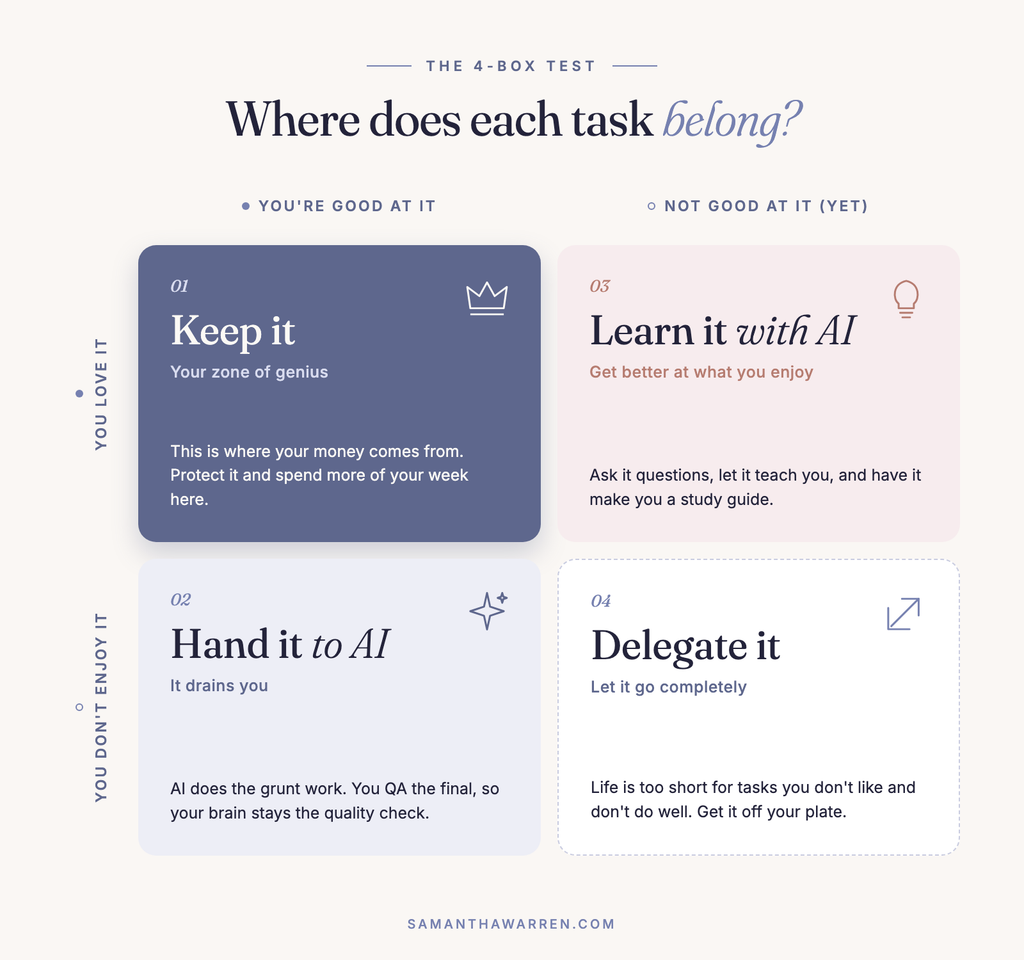
Box 1: You love it and you’re good at it
KEEP IT. This is your zone of genius, and it’s where your money comes from. These are the things that light you up and bring you joy, and they’re also the ways you can be of service to the world and to the people you work with. You want to protect this box and spend more of your week in it, which is the whole reason to clear out the other three.
Box 2: You’re good at it, but you don’t enjoy it
HAND IT TO AI. This one is draining, right? And being good at something is not a good enough reason to keep doing it forever. Because it’s something you’re already good at, you’re going to know exactly how to prompt AI so it does almost as good a job as you would have.
The idea is that the AI does the grunt work, and then you QA the final. You make sure it meets your standards and revise it with the help of the AI. You’re basically turning AI into your assistant for the work you don’t like to do, and your brain stays the final quality check on everything.
Box 3: You love it, but you’re not great at it yet
LEARN IT WITH AI. This is a great opportunity to collaborate with AI so you can get better and better at something you actually enjoy. Ask it questions, let it teach you, and have it make you a study guide. There’s endless information out there, and an AI chatbot can answer your very specific questions about the thing you’re learning, so use that to your advantage.
Box 4: You don’t like it and you’re not good at it
DELEGATE IT. You’ve got to let go of this one completely, girl. Delegate, delegate, delegate, and get that sh*t off your plate. Life is too short to spend your time on things you don’t like doing, that don’t light you up, and that don’t add value to anything. So let it go.
Step 2: Run a deep research query for everything on your list
Once you’ve sorted your tasks, you’ll have a list of things you want to hand to AI, delegate, or get off your plate. For every single one of them, the next step is to run a deep research query.
I prefer ChatGPT for research because I think its Deep Research feature is excellent. I know other people love Claude, and some people use Perplexity, and all of them are great. It’s really up to you which one you use, but I’ll walk you through it with ChatGPT Deep Research.
The prompt below gives ChatGPT very specific criteria, so it can come back with the exact information you need instead of a generic list.
FILL IN YOUR CURRENT PROCESS
The prompt opens with how much time you spend on the task, what the task is, and what your process looks like right now: what you start with, your current steps, and the output you want to end up with. The more detailed, the better, but you don’t have to spend three hours writing this. Give it just enough context to understand your process. Your desired output can be what you already produce or something even better, if you feel like you’re not doing a good enough job at it right now and want to level up.
TELL IT YOUR GOAL
Next, the prompt tells ChatGPT that the goal is to reduce or eliminate the manual time you spend on this workflow without sacrificing quality, and to research the best AI tools, automation tools, software, integrations, APIs, or combinations of tools that could get it done. If you don’t know all this technical language yet, that’s okay. You’re just doing research at this stage, and the prompt explains exactly what you’re looking for.
ASK FOR A SYSTEM, WITH THE CRITERIA SPELLED OUT
This is my favorite part. The prompt asks ChatGPT to design the best practical system for your specific workflow, and it lists the criteria it should rate each tool on, like which parts of your workflow it could automate and what would still need a human. It also asks whether there’s a way to eliminate, simplify, or redesign parts of the workflow entirely, which is often where the biggest time savings hide. Then it tells ChatGPT to prioritize getting the most time back.
ADD YOUR OWN CRITERIA
You can add anything that matters to you. For example, “I don’t want to spend a lot of money. My budget for this is X.” You need all of this information to choose a tool and a workflow that actually works for your situation. Don’t just go by the hype, or by whatever this influencer or that content creator said, because a lot of people talk about AI tools just to make a quick buck. You want to decide based on your own criteria.
The full deep research prompt
Copy this, fill in the brackets, and run it once for each task you want off your plate.
I currently spend approximately [TIME] doing [TASK / WORKFLOW].
Right now, my process looks like this:
Input: [WHAT YOU START WITH]
Current steps: 1) [STEP 1] 2) [STEP 2] 3) [STEP 3] 4) [STEP 4]
Desired output: [WHAT YOU WANT TO END UP WITH]
My goal is to reduce or eliminate the amount of manual time I spend on this workflow without significantly sacrificing quality.
Research the best current AI tools, automation tools, software, integrations, APIs, or combinations of tools that could accomplish this.
Do not just give me a generic list of tools. I want you to design the best practical system for this specific workflow.
For each strong option, evaluate:
- What parts of my workflow it could automate
- What would still require human involvement
- How much time it could realistically save
- Output quality
- Level of customization
- Ease of setup
- Ongoing maintenance required
- Integrations and API capabilities
- Whether it can connect with tools I already use: [CURRENT TECH STACK]
- Current pricing
- Usage limits
- Important limitations or drawbacks
- Whether users report needing significant manual cleanup
- Whether there are better alternatives using multiple tools together
Also investigate whether there is a way to eliminate, simplify, or redesign parts of the workflow entirely instead of merely automating the existing process.
Prioritize solutions that:
- 1) Give me the most time back
- 2) Require the least ongoing babysitting
- 3) Maintain a high-quality final output
- 4) Are reliable enough to use repeatedly
- 5) Are reasonably cost-effective relative to the time saved
- 6) Can scale as the volume of work increases
At the end, give me:
- Best overall system: The tool or combination of tools you would use for this workflow.
- Recommended workflow: Show me exactly how information/files would move from the starting point to the finished output.
- What I would still need to do manually: Be specific.
- Estimated time saved: Compare the current workflow with the proposed workflow.
- Cost: Estimated monthly and/or usage-based cost.
- Setup requirements: Explain what would need to be configured initially.
- Alternative options: Include 2 to 3 alternatives and explain when each would make more sense.
- Build-it-yourself option: If relevant, tell me whether this could be built more effectively using tools like Claude, ChatGPT, Codex, GitHub, Make, Zapier, n8n, APIs, scripts, or custom agents instead of paying for another standalone SaaS tool.
Favor the simplest system that removes the greatest amount of manual work rather than the system with the most features.
Step 3: Let AI read the report for you
At the end, you’ll have a report that ranks the best overall system and the recommended workflow, tells you what you still need to do manually (so you know what you’re getting yourself into), and estimates the time you’ll save and what it’ll cost. That’s everything you need to decide which workflow to use, which tool is best, and whether it’s going to cost you anything.
This prompt has placeholders, so you can use it for anything from video editing to, well, anything you can think of. Run it for every task you want to automate and generate a report for each one. And if you don’t want to read the whole thing, you can get the AI to read it for you. Just ask it questions and pull out the key insights you need. Like I always say, we’re about working smarter and not harder over here.
FAQ
1) How do I decide what to automate in my business?
Sort every task by two questions: do you like doing it, and are you good at it? Keep what you love and are good at, hand what you’re good at but don’t enjoy to AI, learn what you love but aren’t great at yet with AI, and delegate what you neither like nor do well.
2) What should I hand to AI first?
Start with the tasks you’re already good at but don’t enjoy. Because you know how they should be done, you can prompt AI well and check its work, and you’ll feel the relief fastest.
3) Which AI tool is best for researching automation tools?
I prefer ChatGPT’s Deep Research feature, but Claude and Perplexity are both excellent too. Pick the one you like using, and let the prompt above do the heavy lifting.
4) Do I need to understand the technical terms in the prompt?
You don’t need to know them yet. The prompt explains what you’re looking for, and at this stage you’re only researching. You can ask the AI to explain any tool or term in its report.
5) How do I avoid wasting money on the wrong AI tool?
Add your budget and your must-haves to the prompt, and choose based on your own criteria instead of whatever’s trending. The report shows the cost and the time saved side by side, so you can see what’s actually worth it.
Here’s what I want you to take away…
Time is money, and honestly, it’s even more valuable than money. We’re all about having more time to do cool stuff over here. I’ve lived and worked in seven countries since starting my business, and I’m an expat now with my roots in Panamá.
I ran my business from Spain, Costa Rica, Thailand, Colombia, Peru, and Mexico and saw so many beautiful places, and if I didn’t have my AI workflows, my automations, and ways of delegating everything outside my zone of genius, I would have been glued to my computer the whole time. I love the idea of you becoming the woman whose business runs on simple systems, so she spends her days in her zone of genius and still has time for the life she’s building it for.
Tell me which box is costing you the most time
This topic is near and dear to my heart, because I love helping women get more of their time back. DM me on Instagram at @SamanthaLeeWarren and tell me: which box is eating most of your week right now, and what’s the first task you’re taking off your plate? I read every single one. 🪄
Pin me to your favorite Pinterest board!